 NabBar
Know how much Claude and Codex you have left
NabBar puts your Claude, Codex and Command Code limits in the macOS menu bar, on a Touch Portal deck and on your iPhone Home Screen, so you stop finding out mid-task that you've hit the cap.
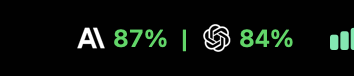
The menu bar: percent left in the current 5-hour window.
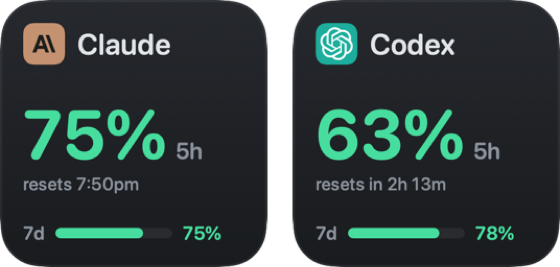
The same numbers as Touch Portal buttons, with reset time and the weekly limit.
What you get
NabBar checks every 5 minutes, or when you click Refresh. A Claude check takes about 3 seconds.
Menu bar
Percent left for each tool. Click it for the 5-hour and weekly limits and when each one resets.
Touch Portal
A ready-made button face per tool: logo, 5-hour number in its colour, reset time and a weekly bar.
iPhone widget
Claude and Codex side by side on your Home Screen, through the Notify! app.
Working and done dots
A blue dot on the Claude or Codex logo while it works on a task, green when it finishes. Opening the menu clears it.
Alerts
A macOS notification when a limit drops into yellow or red, or runs out.
Runs beside ClaudeBar
NabBar is built on ClaudeBar but keeps its own app and settings, so you can run both.
Set up each tool
NabBar reads usage from the tools you already use. It never logs in for you and never changes their logins.
| Tool | What NabBar needs |
|---|---|
| Claude | The claude CLI, logged in: run claude auth login, then claude once and pick a theme. |
| Codex | The Codex CLI. If you only have the copy inside the ChatGPT app, choose it in Settings → Providers → Codex. |
| Command Code | Be logged in to Command Code. |
What NabBar reads and sends
It only reads what the tools already keep on your Mac, and it never refreshes or rewrites their tokens. When one expires, it tells you to log in again with that tool.
- Claude: the output of
claude /usage, your plan from~/.claude.json, and Claude Code's session logs for daily cost and tokens. - Codex: the output of the Codex CLI.
- Command Code: its saved token, sent only to Command Code's own API.
- Writes only its own files in
~/.nabbarand a log that never contains tokens. - Sends nothing unless you turn on Notify!, and then only tool names, percentages and reset times.
Install
- Download NabBar.dmg, open it and drag NabBar into Applications.
- Open NabBar. macOS says it can't verify the developer. Click Done, go to System Settings → Privacy & Security, and click Open Anyway next to "NabBar was blocked". You only do this once.
- NabBar appears in the menu bar. It has no Dock icon.
For Touch Portal, download NabBar-TouchPortal.tpp from the latest release and import it in Touch Portal → Settings → Plug-ins. Setup for the button faces and the iPhone widget is in the README.